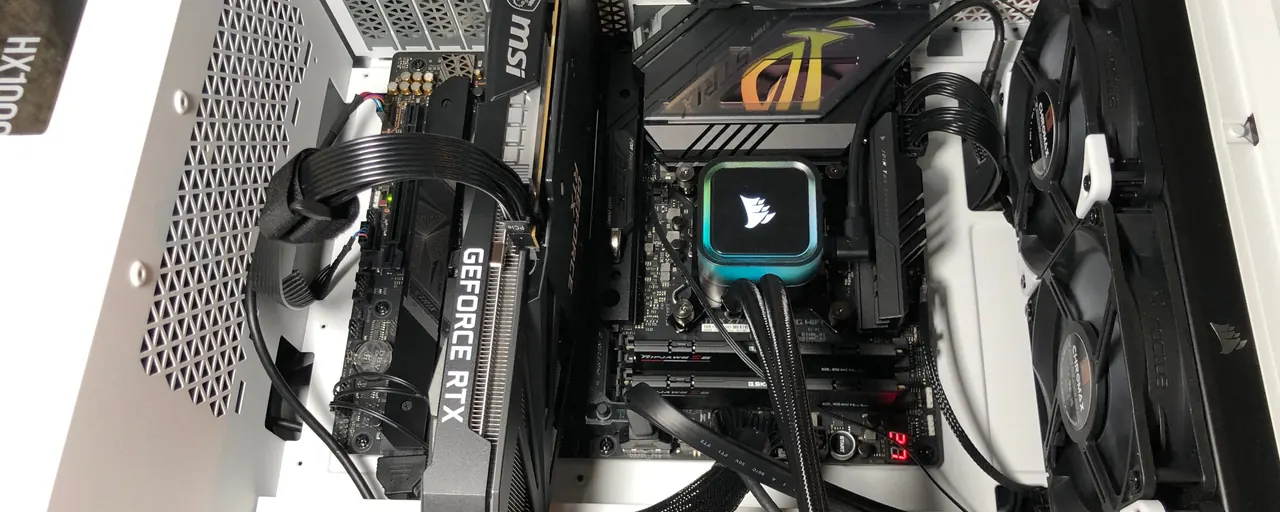

The LGA 1851 socket made its debut with Intel's 15th generation Core Ultra processors, code-named "Arrow Lake," in 2024.
This article will explore the motherboards that are compatible with the LGA 1851 socket and offer recommendations for compatible CPUs, motherboards, CPU coolers, and memory, covering all essential components for a comprehensive system build.
Check out my Recommended LGA 1851 CPUs and Motherboards below.
Chipsets for 12th, 13th, and 14th Generation CPUs

Motherboards for Intel processors are made with chipsets provided by Intel. Each chipset offers a unique set of capabilities. However, motherboards must explicitly support features and capabilities for you to use them. Verify that a motherboard supports the features and capabilities you desire.
For 15th Gen Intel Core Ultra 200 series processors, you'll need a motherboard with an LGA 1851 socket and a 800-series chipset.
The Intel Core Ultra Desktop Processors (Series 2) introduce the LGA 1851 socket, designed to accommodate more pins than its predecessor, the LGA 1700. Despite sharing the same physical dimensions, the LGA 1851 socket is not backward compatible, necessitating a new motherboard. Additionally, these processors require the Intel 800-series desktop chipset, making them incompatible with older 700 and 600 series chipsets.
A CPU cooler compatible with the LGA 1851 socket will be required. Fortunately, existing CPU coolers designed for LGA 1700 remain compatible with LGA 1851, thanks to the identical mounting hole configuration.
To summarize, upgrading to the new processors requires a new motherboard and chipset, but it also enables seamless integration of existing cooling systems.
Z890 supports CPU multiplier overclocking with unlocked CPUs and RAM overclocking. B860 supports RAM overclocking. H810 supports neither CPU nor RAM overclocking. Choose Z890 if you intend to overclock an unlocked Core Ultra CPU; B860 is an option if you only want RAM overclocking.
The W880 and Q870 chipsets are intended for workstation and business use cases; their availability in stand-alone motherboards is limited.
for a specific LGA 1851 Core CPU:
| Z890 | B860 | H810 | |
|---|---|---|---|
| Recommended Usage | For Enthusiast Gamer PCs | For General Home and Gaming PCs | For Budget PCs |
| Launch Date | Q3 2024 | Q1 2025 | Q1 2025 |
| CPU Overclocking | Yes | No | No |
| Memory Overclocking | Yes | Yes | Yes |
| PCIe 5.0 Slots via Processor | Two x16 or Four x8 | One x16 | One x16 |
| PCIe 4.0 Slots via Processor | One x4 | One x4 | No |
| PCIe 4.0 Lanes via Chipset | Up to 24 | Up to 14 | Up to 8 |
| PCIe 3.0 Lanes via Chipset | Up to 8 | Up to 8 | No |
| Memory Channels | 2 | 2 | 2 |
| Integrated Wireless | Wi-Fi 7 | Wi-Fi 6E | Wi-Fi 6 |
| DMI 4.0 Lanes | 8 | 4 | 4 |
| USB 3.2 Gen 2x2 (20 Gbps) | Up to 5 | Up to 2 | No |
| USB 3.2 Gen 2x1 (10 Gbps) | Up to 10 | Up to 4 | Up to 2 |
| USB 3.2 Gen 1x1 (5 Gbps) | Up to 10 | Up to 6 | Up to 4 |
| USB 2.0 Ports | Up to 14 | Up to 12 | Up to 10 |
| Wi-Fi Support | Wi-Fi 7 | Wi-Fi 6E | Wi-Fi 6 |
| SATA III Ports (6 Gbps) | Up to 8 | Up to 4 | Up to 4 |
| PCIe RAID Support | 0,1,5,10 | No | No |
| SATA RAID Support | 0,1,5,10 | No | No |
MOTHERBOARD The motherboard must support overclocking to use overclocking capabilities. Motherboards with Z-prefixed chipsets more commonly support overclocking.
Recommended LGA 1851 Motherboards and CPUs
Best Intel 15th Gen High-Performance CPU and Motherboard
- Our recommended Intel 15th Gen high-performance enthusiast CPU:
- 5.7 GHz max turbo frequency: Optimized for gaming, AI workloads, and content creation.
- 24 cores (8 Performance + 16 Efficiency): Combines raw power with multitasking efficiency for demanding workflows.
- 36 MB L3 + 40 MB L2 cache: Accelerates data-intensive tasks like video rendering and machine learning.
- 250W max turbo power: Balances performance with improved thermal efficiency compared to previous generations.
- 13 TOPS NPU: Dedicated AI engine for enhanced inference performance (though outperformed by discrete GPUs).
- Check the latest price of the Intel Core Ultra 9 285K on Amazon

- Requires motherboards with Z890 chipset for full feature support, including PCIe 5.0 and DDR5-6400+ memory.
- Our recommended motherboard for Core Ultra 9 285K:
- Z890 chipset: Unlocks PCIe 5.0 x16 GPU support and PCIe 5.0 x4 NVMe storage.
- 256 GB DDR5-9200 (OC) support: Quad-channel memory architecture for bandwidth-hungry applications.
- Wi-Fi 7 & 2.5G LAN: Delivers 40 Gbps wireless speeds and low-latency gaming connectivity.
- Thunderbolt 4 (40 Gbps): Supports 8K displays and high-speed peripherals.
- 4x M.2 slots: 1x PCIe 5.0 + 3x PCIe 4.0 NVMe support for multi-terabyte storage.
- 16+1+2 phase VRM: 80A power stages ensure stable overclocking headroom.
- Check the latest price of the Gigabyte Z890 Aorus Elite Wifi7 on Amazon
Best Runner-Up Intel 15th Gen CPU and Motherboard
- Our recommended Intel 15th Gen high-performance CPU:
- 8 Performance + 12 Efficiency cores (20 total) with 30 MB shared L3 cache for multi-threaded workloads like video encoding.
- 5.5 GHz max turbo (Performance cores) and 4.6 GHz (Efficiency cores), using TSMC's 3nm process for 35% improved efficiency over 14th-gen.
- 62°C peak gaming temps and 376W system power draw in Cyberpunk 2077 - significantly cooler than previous Intel CPUs.
- First Intel desktop CPU with 13 TOPS NPU for local AI tasks.
- Supports DDR5-6400 and PCIe 5.0, but lacks Hyper-Threading.
- Check price of Intel Core Ultra 7 265K on Amazon
- Our recommended motherboard:
- LGA 1851 socket with 12+1+2+1 80A power stages - stable power delivery for Core Ultra CPUs.
- DDR5-8800+ (OC) support (256 GB max) and PCIe 5.0 x16 slot + 3x M.2 (1x PCIe 5.0, 2x PCIe 4.0).
- Wi-Fi 7 (2.9 Gbps) + Bluetooth 5.4 + 2.5 Gb Ethernet.
- Military-grade components with reinforced PCIe slots and comprehensive VRM cooling.
- USB 20 Gbps Type-C with DisplayPort support and front-panel USB 10Gbps header.
- Check price of ASUS TUF Gaming B860M-PLUS WiFi on Amazon
Best Value Intel Core Ultra CPU and Motherboard
- Our recommended Intel Core Ultra best value CPU:
- 5.2 GHz max turbo frequency (P-cores) for gaming and intensive workloads
- 14 cores (6 Performance + 8 Efficiency) with 14 threads
- 24 MB Intel Smart Cache + 26 MB L2 cache for reduced latency
- 125W base power with 159W max turbo for efficient performance scaling
- Integrated Intel Arc Xe-LPG Graphics (4 Xe-cores, 1.9 GHz boost)
- Supports DDR5-6400 and PCIe 5.0 connectivity
- Check the latest price of the Intel Core Ultra 5 245K on Amazon
- Our recommended value motherboard:
- LGA 1851 socket for Intel Core Ultra Processors (Series 2)
- DDR5-6400 support (128 GB max) with dual-channel architecture
- PCIe 4.0 expansion:
- 1x PCIe 4.0 x16 slot (GPU)
- 1x PCIe 4.0 x1 slot
- Storage features:
- 2x M.2 slots (PCIe 4.0 x4 and x2)
- 4x SATA 6 Gb/s ports
- Wi-Fi 6 and Bluetooth 5.3 connectivity
- 2.5 GHz Ethernet + USB 5 Gbps Type-C support
- Check the latest price of the ASUS Prime H810M-A WiFi on Amazon
Recommended LGA 1851 Coolers
A CPU cooler compatible with the LGA 1851 socket will be required. Fortunately, existing CPU coolers designed for LGA 1700 remain compatible with LGA 1851, thanks to the identical mounting hole configuration.
Locked Intel CPUs are typically bundled with a stock CPU cooler and are identifiable by the absence of the "K" in their model name. While these coolers are adequate for preventing the CPU from overheating, they may limit the processor's performance during demanding tasks such as gaming. Additionally, stock coolers may produce noticeable noise when running at maximum speed.
A higher TDP cooler is recommended to sustain the peak speeds for extended periods to ensure optimal performance.
A CPU cooler compatible with the LGA 1851 socket will be required. Use the cooler's LGA 1851 mounting hardware.
Best LGA 1851 AIO Liquid Coolers
ARCTIC Liquid Freezer III Pro 360
ARCTIC Liquid Freezer III Pro 360 Supports LGA 1851: YES Radiator: 360 mm, 38 mm thick Fans: 3 x 120 mm Type: Liquid Cooler Check the latest price of the ARCTIC Liquid Freezer III Pro 360 on Amazon
Choose this 360 mm AIO for a build with room for a large radiator, such as a CPU-heavy workstation. The three 120 mm fans move heat out through the radiator; the pump and fans support PWM control.
Supports AM4, AM5, LGA 1700 and LGA 1851. The 38 mm radiator is thicker than many AIO radiators; check radiator, fan and motherboard clearance in your case.
Best LGA 1851 Dual-Fan Air CPU Coolers
Thermalright Phantom Spirit 120 SE Black
Thermalright Phantom Spirit 120 SE Black Supports LGA 1851: YES Height: 154 mm Fans: 2 x 120 mm Heatpipes: 7 Check the latest price of the Thermalright Phantom Spirit 120 SE Black on Amazon
A dual-tower air cooler with seven heatpipes and two PWM fans. Choose it for a fan-cooled build without a liquid-cooling pump or RGB wiring.
Supports AM4, AM5, LGA 115x, 1200, 1700 and 1851. Allow 154 mm of case clearance, plus any extra height needed if the front fan must be raised above tall RAM.
Noctua NH-D15
Noctua NH-D15 Supports LGA 1851: YES Height: 165 mm Fans: 2 x 140 mm Max. fan noise: 24.6 dB(A) Type: Heatsink & Fans Check the latest price of the Noctua NH-D15 on Amazon
A premium dual-tower air cooler with two 140 mm PWM fans. Choose it if you prefer Noctua's fan design, mounting hardware and six-year warranty.
Check the 165 mm case clearance and RAM height; raising the front fan above tall modules increases the space required. Older packages may need the appropriate mounting kit for newer sockets.
Thermaltake TOUGHAIR 510
Thermaltake TOUGHAIR 510 Supports LGA 1851: YES Max TDP: 180 watt Type: Heatsink & Fans As someone who isn't a big fan of flashy LED lights, I appreciated the simplicity of the Thermaltake TOUGHAIR 510, which doesn't have any fancy lights but still looks great in my system.
I found that the dual 120 mm fans on the TOUGHAIR 510 did an excellent job of keeping an LGA 1851 CPU cool, even under heavy workloads.
If you're worried about the TOUGHAIR 510 taking up too much space in your system, Thermaltake offers a few single-fan variants that use different orientations, so you can choose the one that works best for your setup.
With a max speed of 2000 RPM, the TOUGHAIR 510 provides optimal cooling performance when you need it most.
With a 180-watt TDP (Thermal Design Power), the TOUGHAIR 510 offers solid cooling performance and is a great choice for anyone looking for a reliable and efficient cooling solution for their CPU.
Our Recommended RAM
Before purchasing memory, we suggest that you review your motherboard specification to verify which speeds are supported. For example, if a DDR4 motherboard stated that it supports "DDR4 3400(O.C.) / 3333(O.C.) / 3300(O.C.) / 3200 / 3000," that would mean that it could support DDR4-3400, DDR4-3333, and DDR4-3300 with memory overclocking, and DDR4-3200 and DDR4-3000 at stock speeds. Motherboard specifications also indicate the maximum capacity per stick of RAM (DIMM) and across all slots.
for a specific LGA 1851 CPU:
Recommended DDR5
- At an effective frequency of 5600 MHz, this memory hits the fastest DDR5 speed supported by Intel's 13th Gen CPUs without overclocking.
- 32 GB provides ample memory for gaming and multitasking.
- Optimized for Intel XMP 3.0.
Recommended DDR4
- At an effective frequency of 3200 MHz, this memory hits the fastest supported stock DDR4 speeds.
- It is also available in other (effective) frequencies for overclockers, including 3600 MHz and 4000 MHz.
- Lower-speed versions are also available on Amazon, in various capacities, including DDR4-2933 , DDR4-2666 , and DDR4-2400
- The low-profile form factor ensures that the heat spreaders don't get in the way of other devices, including your CPU heatsink.